Service Area Pages vs. Location Pages: Which Is Better for SEO?
A business can serve customers in 20 cities without having 20 physical offices. But that does not mean it needs 20 location pages.
The real question is: what type of local page accurately represents your business, matches search intent, and provides enough unique value to deserve its own URL?
The answer usually comes down to one distinction:
• You travel to customers: service area page
• Customers come to you: location page
• You have both: use both strategically
Creating local pages by simply changing the city name is not a strong local SEO strategy. Each page needs a clear purpose, useful information, local relevance and a logical place within your website.
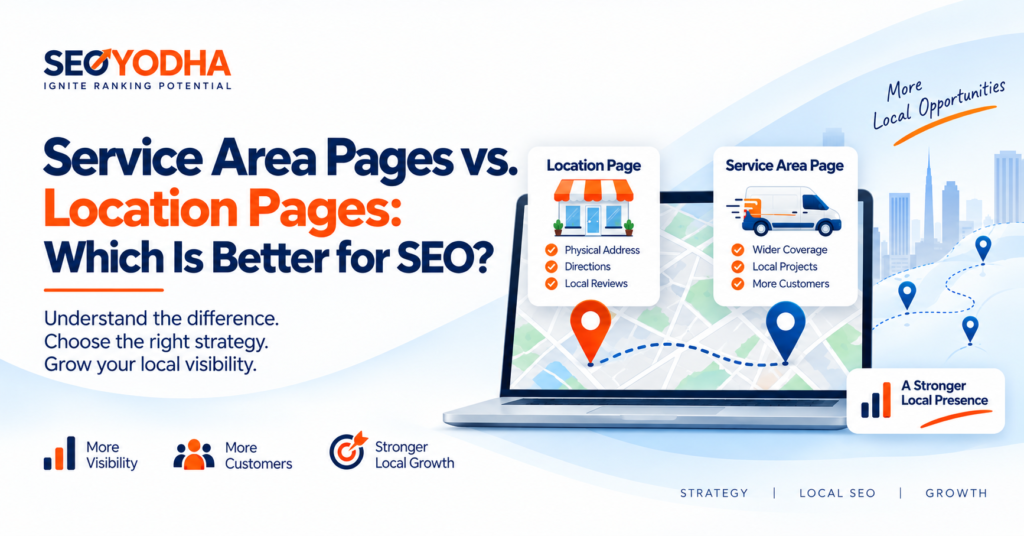
Service Area Pages vs. Location Pages
| Factor | Location Page | Service Area Page |
| Represents | A physical business location | An area where services are provided |
| Physical address | Yes | Not required |
| Typical businesses | Dentists, restaurants, offices, retailers | Plumbers, HVAC, roofers, electricians |
| Main focus | Visiting the business | Getting service at the customer’s location |
| Local content | Branch-specific information | Area-specific service information |
| CTA | Visit, call, book | Request service, call, schedule |
| Local proof | Address, photos, reviews, staff | Local projects, coverage, customer examples |
The key is accuracy. A service-area business should never create a fake local address just to appear more local.
What Is a Location Page?
A location page represents a genuine physical location that customers can visit. A dental practice with offices in Las Vegas and Henderson, for example, can create a dedicated page for each real office. A useful location page includes:
- Business name, address and phone number (NAP), matching your Google Business Profile exactly
- Click-to-call phone numbers and an address that links to your map listing
- Opening hours, directions and parking information
- An embedded map
- Location-specific services and staff
- Real photos of the location
- Reviews from that branch
- Local FAQs and nearby landmarks
- Local business schema
It should work like a digital version of the physical location. Someone should be able to see where it is, what it offers, when it is open and what a visit involves.
What Is a Service Area Page?
A service area page represents an area where a business genuinely provides its services, even though it has no office there. This model is common for HVAC companies, plumbers, roofers, electricians, pest control firms, landscapers, cleaners and restoration companies.
An HVAC company with an office in Las Vegas might serve Henderson, North Las Vegas, Summerlin and Enterprise. Each service area page should explain:
- Which services are available
- What types of customers are served
- Common local service needs
- Local projects or examples
- Coverage, scheduling and any travel considerations
- FAQs and a clear service CTA
The page should say “We provide this service in this area.” It should not imply “We have an office here.”
Trades like roofing show why this matters: homeowners search by service and by city, so a company usually needs dedicated pages for each service and each area it covers. Our roofing SEO page shows how that structure works in practice.
Which Is Better for SEO?
There is no universal winner. The right page type depends on how your business actually operates and what searchers expect to find.
- If customers visit a genuine physical location, use a location page.
- If your team travels to customers, use a service area page.
- If you have physical locations and also serve surrounding areas, use both.
The biggest mistake is treating local SEO as a numbers game. Fifty city pages do not create fifty ranking opportunities, especially if they are near-identical with only the city changed. Google’s people-first content guidance stresses useful content for people over content made mainly for search engines, and its spam policies warn against mass-producing similar pages for different cities.
So before creating another city page, ask: does this location deserve its own useful page?
Search Intent Should Determine the Page Type
Keyword research alone shouldn’t decide this. Consider what the searcher actually wants.
“Dentist near me”: the searcher probably wants a practice they can visit. A location page with directions, hours, reviews and office details fits.
“Emergency plumber in Henderson”: the searcher wants someone who will come to them. A service area page explaining emergency availability in Henderson fits better.
Before building a page, ask whether the business actually serves the area, whether the area matters commercially, whether you can offer unique information and local proof, and whether the page supports a real customer journey. If most answers are no, you probably don’t need another page.
Not Every Service Area Needs Its Own Page
One of the most important local SEO decisions is knowing when not to create a page. A service area deserves a dedicated page when you can show:
- Real service availability and meaningful customer demand
- Commercial importance
- Unique local information and relevant projects
- A distinct search intent and a useful conversion path
If an HVAC company gets real customers from Henderson, has completed projects there and wants to grow that market, a Henderson page is worthwhile. But if the only difference between two pages is “We provide HVAC services in Henderson” versus “We provide HVAC services in Summerlin,” creating both adds little. A city name alone is not unique content.
A note for storefront businesses: if you have an office but want visibility in nearby towns, you often don’t need separate pages. Mention those communities naturally on your location page, using honest wording such as “serving customers in [city],” “located near [city]” or “a short drive from [city].” Never claim to be located somewhere you are not.
Avoid City-Name-Swap Pages
A common tactic is to build one template and replace the city name dozens of times, producing URLs like /hvac-henderson/, /hvac-summerlin/ and /hvac-enterprise/ with nearly identical bodies. The result is a large collection of weak pages.
A simple test: if you remove the city name, does the page still contain information that is genuinely different and useful? If not, it needs more local substance or shouldn’t exist. Build pages around real differences instead:
- Local projects and reviews
- Service availability and neighborhood coverage
- Customer types and local problems
- Pricing, scheduling or local conditions
- Area-specific FAQs
The goal isn’t just to mention the city. It’s to prove why your business is relevant to that city.
Internal Linking Matters
Local SEO is also an information architecture problem. Excellent local pages still struggle if they’re poorly connected. A simple chain might be:
HVAC Services → Las Vegas HVAC → Las Vegas AC Repair → HVAC Case Study
That links service, location, specific service and proof. A Las Vegas HVAC page could link to AC repair, furnace repair, emergency HVAC, the Henderson service area, a local case study and relevant guides. Service pages should link back to the locations where that service is actually offered. This helps users navigate and gives search engines clearer context. Google recommends crawlable links so it can discover related pages.
What to Do With Existing Thin Location Pages
If your site already has dozens of location pages, don’t automatically add more. Audit them first, ideally as part of a wider SEO audit, for near-duplicate content, little local proof, no meaningful traffic or conversions, no distinct search intent, weak internal linking or no clear business purpose. Then choose an action:
| Action | When to use it |
| Improve | Add genuinely useful local information and proof. |
| Consolidate | Combine similar pages when one stronger page can serve the intent better. |
| Redirect | Send a weak page to a more relevant, stronger one where appropriate. |
| Remove | Drop pages with no useful purpose or value. |
The objective isn’t the maximum number of indexed URLs. It’s having the right URLs.
When Should You Use Both?
Picture an HVAC company with a physical office in Las Vegas that also sends technicians across the surrounding area. It could have one location page (the Las Vegas office) and service area pages for Henderson, North Las Vegas, Summerlin and Enterprise. The location page focuses on the physical business; the Henderson page focuses on HVAC services available to Henderson customers. They shouldn’t simply repeat each other. For an example of how a regional page can be laid out, see our Florida SEO page.
Local Pages and Google Business Profile
Your website and Google Business Profile should tell a consistent story. Don’t claim an office address on your site that you don’t operate from, and don’t use service area pages to suggest branches that don’t exist. Keep your NAP (name, address, phone number), service coverage, hours and local references accurate and consistent across your site and directories. Website pages support local visibility, but they don’t replace a properly managed Business Profile.
How Local Pages Support AI Search
Local search is increasingly conversational. People ask questions like “Which HVAC companies serve Henderson?” or “Which dentist has an office near Summerlin?” Clear information about where you operate, what you offer, who you serve and what local work you’ve done gives search systems stronger context. That’s another reason to prioritize specific, trustworthy information over repeated city names.
How to Measure Local Page Performance
Don’t judge a local page by keyword ranking alone. Track organic impressions and traffic, local keyword visibility, calls, form submissions, engagement, conversion rate and visits to related service pages. A page that ranks for a city keyword but produces no business value is less useful than one that delivers qualified leads. You can see how we track results in our SEO case studies.
Quick Decision Framework
| Use this | When |
| Location page | You have a genuine physical location customers can visit, branch-specific information and local proof. |
| Service area page | You actively serve the area without an office there, customers hire you to visit their property, and you can provide useful local information. |
| Both | You have a physical location, you also serve customers outside it, and each page serves a distinct purpose. |
Don’t create a page just because a city has search volume. Create it because the business has a real relationship with that market and the page can provide useful information.
FAQs
Can I create a service area page for a city where I don’t have an office?
Yes, if you genuinely provide services there. Make clear the page represents service coverage, not a physical location.
Do service area pages need a physical address?
No. Never invent an address or use a virtual office or PO box just to appear local.
How many city pages should I create?
There’s no fixed number. Prioritize by actual coverage, customer demand, commercial value, local proof and your ability to create useful content.
Can a business have both page types?
Yes. A business with a physical location and a mobile team can use both, provided the pages serve different purposes.
Do location pages replace Google Business Profile?
No. They serve different functions and should show consistent business information.
Final Takeaway
The question isn’t simply which page type is better. It’s which page accurately represents our business, matches what customers are searching for, and provides enough unique value to deserve its own URL?
If customers come to you, build a useful location page. If you travel to them, build service area pages around genuine coverage. If you do both, use both strategically.
Strong local SEO isn’t about creating the most city pages. It’s about creating the right pages, connecting them through logical internal links, supporting them with real local evidence, and making the relationship between your services and each market clear.
Location page: “This is where our business is.”
Service area page: “This is where we provide our services.”
- By Varun Kumar