Do I Need a Physical Address in a City to Rank There?
You serve six cities. You have an office in exactly one of them. So naturally, the question keeps coming up: should you rent a small office — or worse, a mailbox with a street address — in every city you want to show up in on Google?
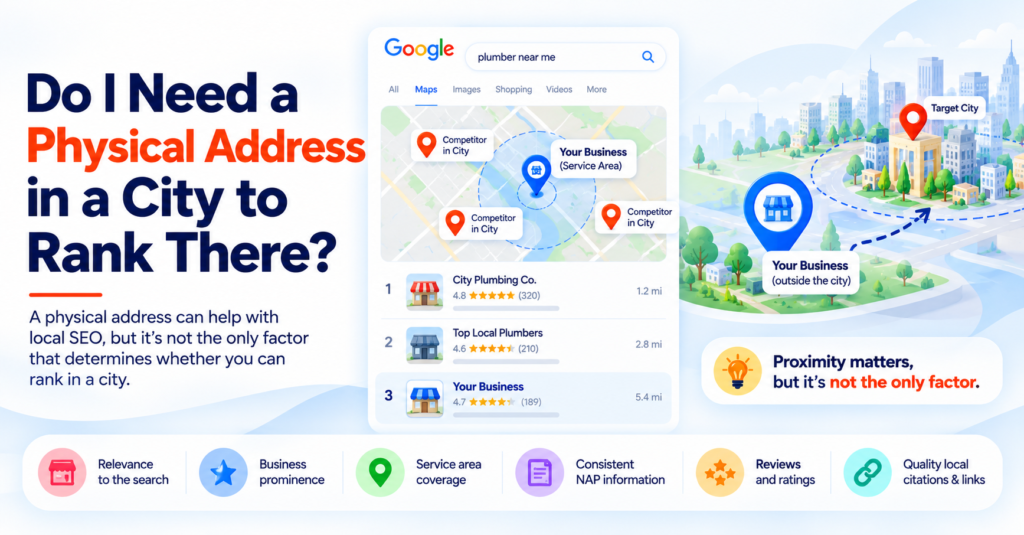
Here’s the short version: no, you don’t need a physical address in every city you serve — but there’s real nuance in how Google treats you without one, and getting it wrong can do more damage than not ranking at all.
The core idea: Google has an entire business category built for exactly this situation — the Service Area Business. Used correctly, it lets you rank in cities you serve without an office there. Used incorrectly (fake addresses, thin doorway pages), it can get your listing suspended or your pages filtered out entirely.
Storefront Business vs. Service-Area Business
Google treats these two business types differently from the ground up, and most of the confusion starts here.
Keyfactor | Storefront Business | Service-Area Business (SAB) |
Examples | Retail shop, restaurant, dental clinic, salon | Plumber, HVAC tech, cleaning service, consultant, mobile groomer |
Address on Google Business Profile | Shown publicly | Hidden — customers see a service area instead |
How Google verifies location | Physical visit, mail, or phone | Service area radius + supporting signals |
Map Pack eligibility per city | Strong, tied to actual proximity | Weaker without a genuine local presence |
Multiple locations | One listing per real address | One listing can list several service areas |
If you’re a service-area business, Google Business Profile has a specific setting for this: instead of publishing your street address, you define a service area — a list of cities, zip codes, or a radius around your base location. This is the legitimate, Google-sanctioned way to say “I don’t have an office here, but I work here.”
The Nuance: Map Pack vs. Organic Results
This is the part that actually answers the question, and it’s usually skipped.
In the Local Map Pack (the 3-listing map results): Google weighs proximity heavily. Without a genuine local presence, you’re at a real disadvantage against a competitor who actually has an office in that city.
In regular organic search results: This is where a well-built location page can genuinely rank, even without a local address — real service details, real coverage confirmation, real local content.
In plain terms: you’re very unlikely to dominate the map pack in a city you don’t have a real presence in. You can absolutely rank in regular search results there with the right page. Most service-area businesses are chasing the wrong prize when they obsess over the map pack for every single city they serve.
What Actually Helps You Rank in a City Without an Office There
If you’re a service-area business, a strong local SEO strategy can help you build visibility in the cities you genuinely serve—even when you don’t have a physical office there. A well-structured local SEO strategy can combine location pages, Google Business Profile optimization, local citations, reviews, and other location signals.
Helps | Why |
A dedicated, unique location page per city | Gives Google (and searchers) a specific page to match the specific search |
Genuine local detail on that page | Real service-area confirmation, and ideally local project examples or testimonials — not a city name swapped into a template |
Local citations mentioning your service area | Directories and listings that confirm you serve that area, not just your home base |
Reviews from customers in that city | A real, ongoing signal that you actually operate there |
Correct service-area setup in Google Business Profile | Lets Google associate your listing with that city properly, without a fake address |
What Actively Hurts You
Hurts | Why |
A virtual office or mailbox listed as your address | Violates Google’s guidelines for service-area businesses and can get the entire listing suspended |
Doorway pages (same content, city name swapped) | Google’s algorithms are specifically built to detect and filter this pattern |
Claiming an address where no one from your business actually works | Grounds for a Google Business Profile suspension if reported or detected |
One generic “areas we serve” page listing 40 cities | Too thin to rank for any single city specifically — spreads relevance across nothing |
A Real Example
Picture a residential cleaning company based in one city, serving five surrounding towns with no office in any of them.
The wrong move: rent a $50/month virtual mailbox in each of the five towns and list those as business addresses. This risks a Google Business Profile suspension the moment it’s flagged — and Google does actively audit for this pattern.
The right move: one real Google Business Profile, service area set to all six towns, plus five distinct Seo Company in Apoka on the website — each with genuine details about the neighborhoods served, response times, and reviews from customers actually in that town.
Quick Self-Check
Before building or fixing your own service-area presence, ask:
- Is your service area correctly configured in Google Business Profile — not a fake address, but the actual service-area setting?
- Does each city have its own page, or is it one page trying to cover everywhere at once?
- Can a stranger tell your pages apart if you swapped the city names — or would they read identically?
- Do you have any reviews or citations tied to each specific city, not just your home base?
- Are you chasing map pack rankings in cities where you have zero physical footprint, when organic rankings might be the realistic, winnable goal instead?
A “no” to any of these points to a specific, fixable gap — not a reason to fake an address.
Frequently Asked Questions
Do I need a physical office in every city I want to rank in?
No. Google has a specific Service Area Business setting for exactly this situation, allowing a business to define the cities or regions it serves without publishing a physical address in each one.
Can I use a virtual office or mailbox as my business address to rank in more cities?
This violates Google’s guidelines for service-area businesses and can result in the entire Google Business Profile listing being suspended. It’s a significant risk for a marginal, often temporary ranking benefit.
Will I show up in the Google Map Pack for cities where I don’t have an office?
It’s possible but harder — Google’s local algorithm weighs proximity heavily in map pack results, so genuine local presence gives a real advantage there. Organic (non-map-pack) rankings are a more realistic target for cities you serve without an office in.
How many location pages should a service-area business create?
One dedicated, genuinely unique page per city or service area actually served — not a single generic page listing every city, and not more pages than can be filled with real, distinct local content.
What’s the difference between a legitimate location page and a doorway page?
A legitimate page has real, specific local detail — actual coverage confirmation, local examples, distinct content. A doorway page is the same template with only the city name changed, which Google’s algorithms are specifically designed to detect and devalue.
- By Varun Kumar